
A local Manhattan store increased sales revenue by over 30% in a few months. Not just by getting more customers or raising prices. But by increasing the value of each transaction.
We did this by analyzing sales data to structure inventory, bundles, and upsells that naturally increase items per cart and average order value (AOV).
Here’s what that looked like in the numbers.
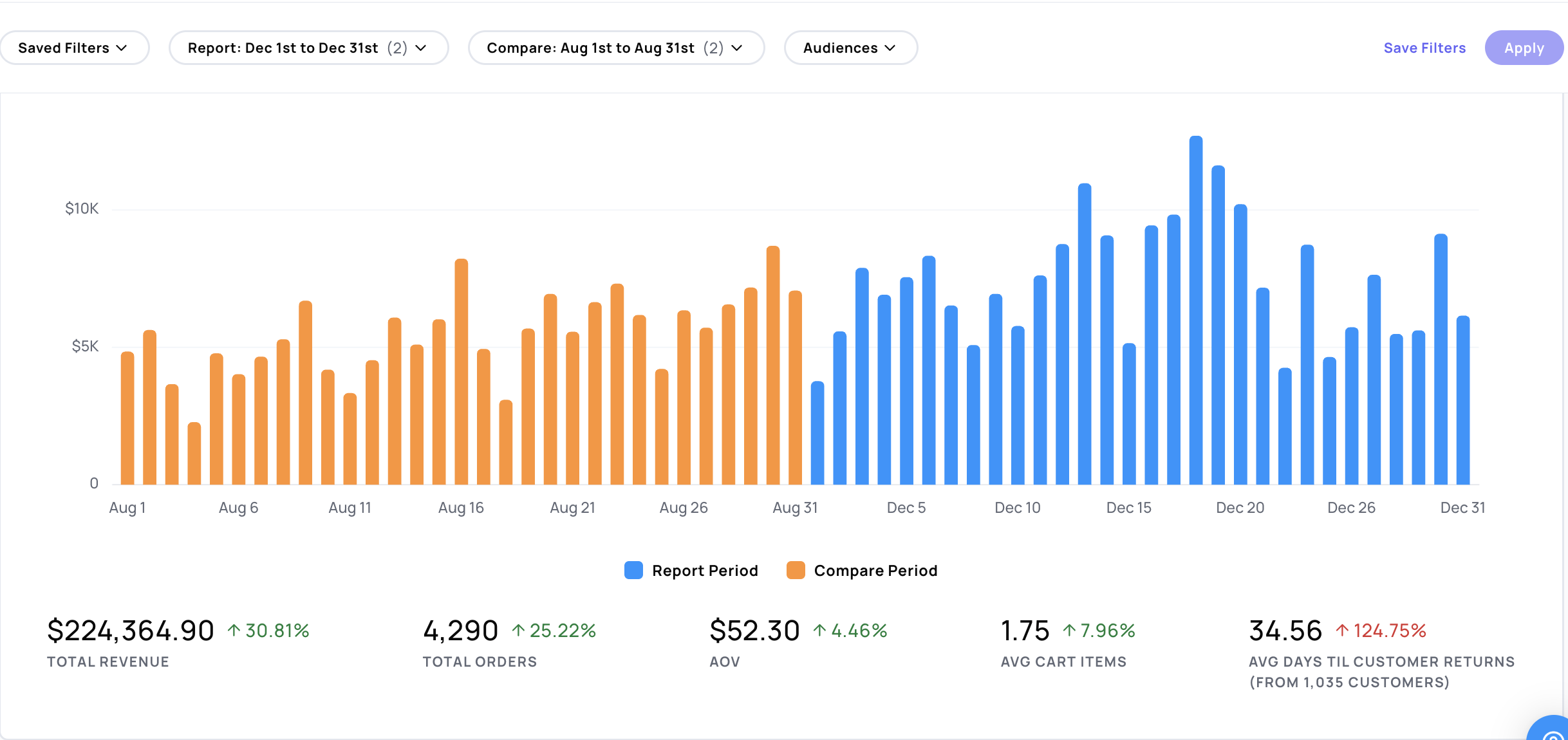
Over a 3-month period, revenue increased by 31%, driven by a 4.46% increase in average order value, and nearly 8% in average cart size.
A $2.33 increase in AOV (4.46%) across 4,290 orders, that adds up to over $10,000 in additional revenue even if they didn’t bring in a single new customer.
The same applies to cart size. An 8% increase to 1.75 items per order means roughly 0.13 more items per transaction. Multiply that across 4,290 orders, and you’re looking at 550+ additional items sold over the same period.
This is where the opportunity is. Small improvements at the transaction level is most efficient way to grow revenue.
Increasing Transaction Value
The biggest opportunity to increase transaction value is in how you you build bundles, position upsells, and guide customers toward adding more to each order.
You can start to see where those opportunities exist by looking at your sales data from the last 90 days.
Here’s how to breakdown that data to make decisions you can trust.
The Framework: Break Your Inventory Into Roles
The goal is to understand how each product contributes to a transaction.
Start with your last 90 days of sales data.
Break your products into categories so you can see performance at two levels:
- how products perform within their category
- and how they contribute to total sales
This gives you context to find category-specific opportunities and gaps where you can introduce upsells and bundles.
Start assigning roles to your products based on how they perform.
1. Anchors
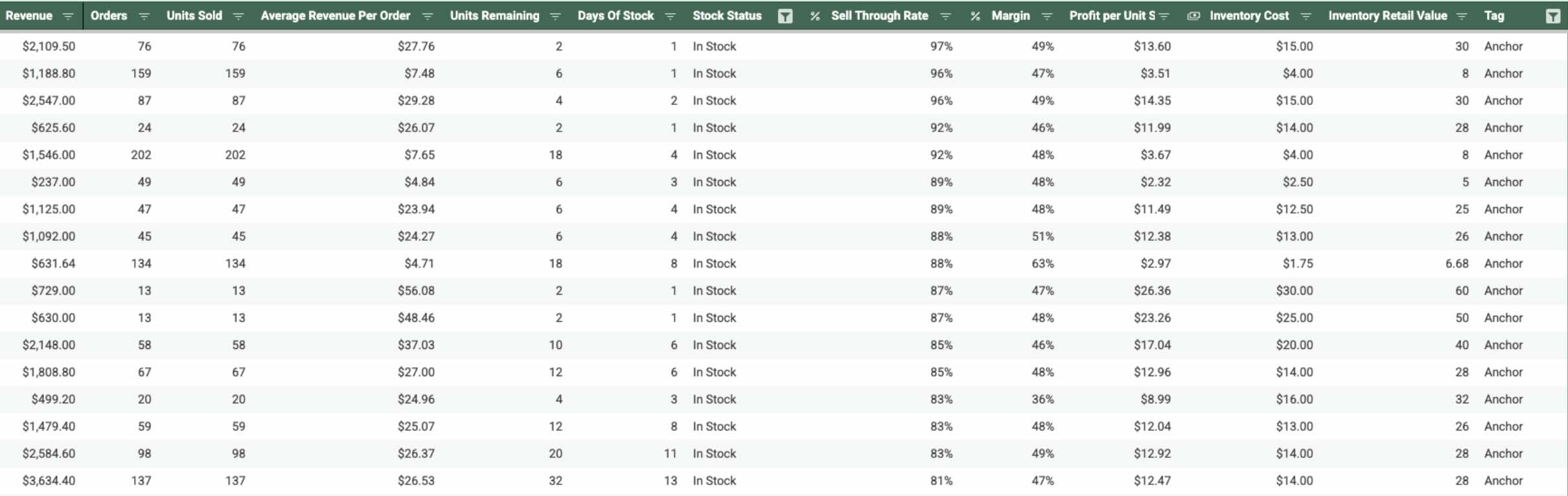
These are the products that show up most often in orders.
Look for:
- highest order frequency
- consistent sell-through
- products customers start with
These drive the transaction.
Everything else should be structured around them.
2. Upsells
An upsell is when you guide a customer toward spending more after they’ve already decided to buy. It can be an upgrade (“go with this instead”) or an add-on (“add this too”) that increases the value of the order.
The customer already decided to purchase. Now they’re deciding how much to buy and which option makes the most sense. They’ve already accepted the cost of the main item, adding a little more feels incremental, not like a new decision.
That’s why a $10–$20 add-on or upgrade is much easier to accept than a $50–$100 standalone purchase.
You can use upsells to improve your revenue and profit per transaction at the same time.
What to look for to find upsell opportunities
Here’s what to look for in your data:
Orders and Sell-Through-Rates
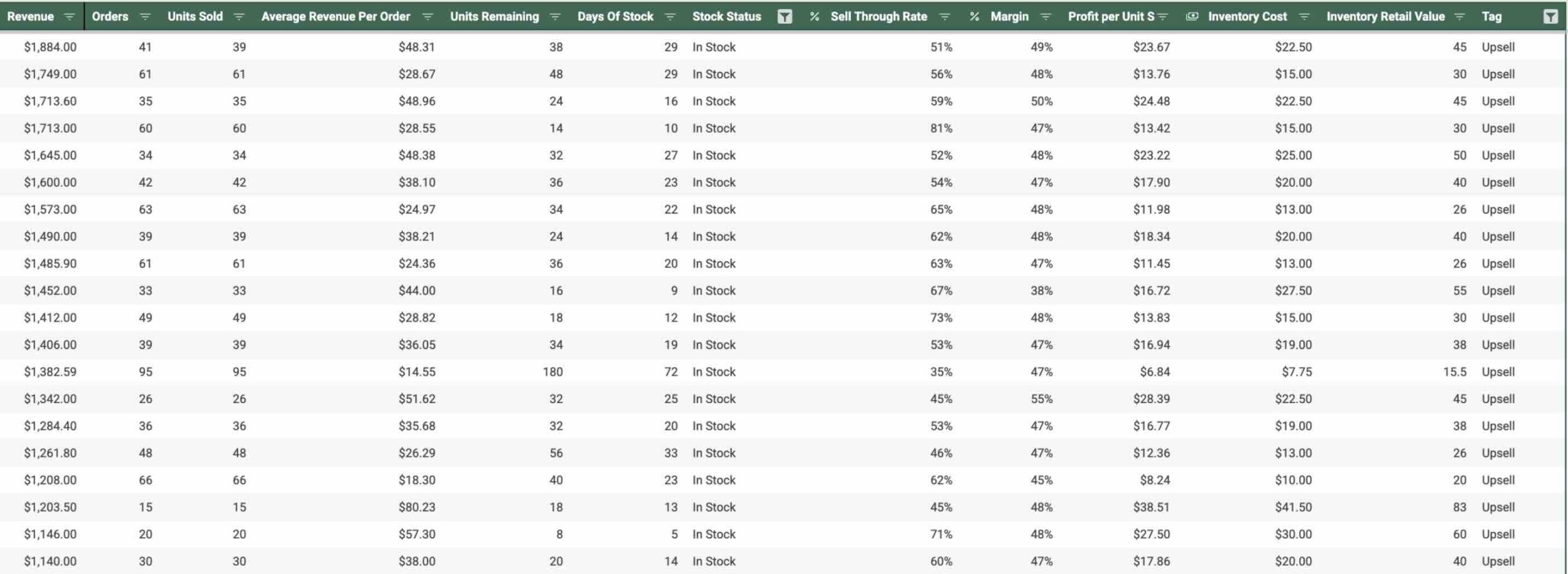
Strong upsell products should be selling , but not consistently enough yet, which give you an opportunity to position them better.
Look at:
- number of orders
- sell-through rates
Upsell opportunities will usually sit in the middle of the pack. They’re not your top sellers, but they’re not inactive either.
If a product occasionally appears alongside your top-selling items, that’s a strong signal it can be positioned as an upsell.
Strong Profitability
Upsells should have higher margins or strong profit per unit so that each one increases profit and revenue.
Complimentary Items
They should clearly complement what the customer is already buying to enhance or complete the main purchase.
How Strategic Upsells Can Help Increase Profit Per Order
To understand why upsells matter, it helps to look at what happens inside a single transaction.
Let’s say a customer buys a $40 product with a 40% margin. That generates $16 in profit.
Now you introduce a $20 add-on product with a 60% margin. That adds $12 in profit to the same order.
So the transaction goes from:
- $40 → $60 in revenue
- $16 → $28 in profit
That’s a 50% increase in revenue and 75% increase in profit from the same customer.
You’re not increasing your prices. You’re increasing the potential for how much you can make per transaction.
And when that happens across thousands of orders, small add-ons can turn into meaningful growth without needing more customers.
How to incorporate into operations
On your menu / website
- Show upsells directly on product pages
- Add “frequently bought together” or “pair with” sections
- Keep them visible at decision points
In-store / staff
- Train staff to suggest one add-on or upgrade per order when appropriate
In bundles
- Pair upsells with anchors
- Use them to increase total order value
Takeaway
We don’t want to just push upgrades and hope customers spend more.
We’re upselling the entire transaction.
Once you know:
- which products bring customers in (anchors)
- which ones increase order value (upsells)
- and how they naturally fit together
You can:
- pair the right products together
- place them where buying decisions are made
- and make it easier for customers to add them to a larger order
It’s a more predictable way to increase revenue from the customers you already have.
3. Bundle Fillers
A bundle filler is a product that helps increase the number of items in an order.
It’s the “might as well add this” moment.
The customer already decided to buy. They’re open to small additions that feel easy and relevant.
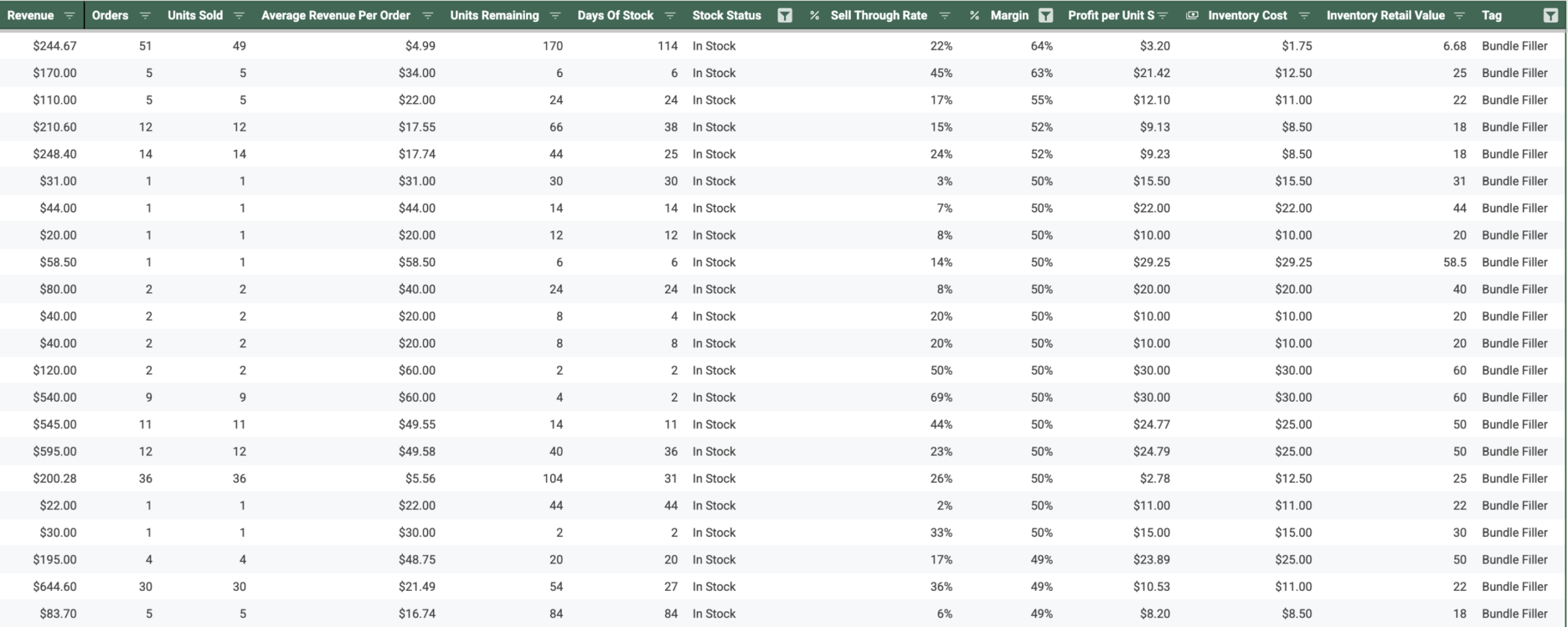
For example, this store has a $6.68 product with a 64% margin, but it’s only selling 22% of its inventory. That makes it a perfect candidate for a bundle. It’s not selling well on its own, but when paired with a strong anchor product, it can increase the overall value of each order.
These aren’t upgrades. They’re low-friction additions. It feels like completing the order.
You can use add-ons and bundle fillers to make it easy to add one more item without much thought.
They make it easy to increase items per cart, move inventory, and grow revenue across transactions.
Here’s what to look for in your data
Orders and sell-through rates
Bundle fillers usually won’t stand out as top sellers.
Look at:
- number of orders
- sell-through rates
They often sit toward the lower end:
- slower-moving products
- inconsistent order frequency
That’s the opportunity.
If a product shows up occasionally in multi-item orders, that’s a signal that you can use it more intentionally as part of a bundle.
Lower price
Bundle fillers should be priced low enough to feel like an easy addition.
Typically:
- on the lower end of your product range
- small enough that customers don’t hesitate
The goal is to reduce friction and make it easy to add one more item.
Complementary items
They should pair naturally with your anchor and upsell products.
Look for items that:
- enhance the main purchase
- add variety or convenience
- complete the experience
If the product makes sense in the same order, it works as a filler.
Remaining inventory
Many bundle fillers come from:
- overstocked items
- slower-moving inventory
- products with higher days of stock
You don’t need to discount these aggressively. Try repositioning them first.
How Bundle Fillers Increase Revenue Per Order
Bundle fillers increase items per cart.
Let’s say:
- average cart size increases from 1.6 → 1.75 items
- across 4,000+ orders
That’s 500+ additional items sold.
You’re generating more revenue and moving more inventory without having to get more customers.
How to incorporate into operations
On your menu / website
- place fillers near anchors and upsells
- use “add-on” or “complete your order” sections
In bundles
- combine fillers with anchors and upsells
- use them to round out the offer
- move slower inventory without heavy discounting
In-store / staff
- suggest them as quick additions
- keep it low pressure
- “Do you want to add this?”
What this changes
Bundle fillers make it easy for customers to add one more item to something they’re already buying.
When you combine:
- anchors (what starts the order)
- upsells (what increases value)
- bundle fillers (what increases quantity)
This isn’t about pushing random products your customers don’t want in an attempt to boost revenue.
You’re marketing internally. Within the transaction itself.
You’re taking products that already make sense together and bringing them into the customer’s field of view at the right moment. Products they may have already been open to buying, but consider.
Instead of relying on the customer to discover everything on their own, you’re highlighting what pairs well together.
This is the difference between a customer buying one item vs building out an entire order that fits their needs.
This is the best way to maximize the demand that already exists for your products.
Increasing Your AOV and Items Per Order
You can increase the value of each transaction by being more intentional with how how you present and combine products.
Start with your last 90 days of sales and look for patterns.
Those patterns tell you how your customers are already buying.
Take your top anchors and:
- attach 1–2 upsells that naturally increase order value
- build simple bundles around combinations that already exist
- place them where customers are making decisions (menu, product pages, in-store conversations)
Now you’re:
- introducing new options to complete the transaction
- making it easier for customers to build a more complete order
- and increasing AOV and items per cart in the process
Small changes compound across every transaction.
That’s how you turn everyday sales into a more predictable, scalable revenue system.