
When your dispensary revenue starts falling, here’s how to figure out where the losses are coming from.
We recently analyzed a dispensary whose revenue fell $16,729 (8.9%), over 30 days.
Breaking down the decline showed much of the lost revenue was concentrated in specific categories, brands, and products.
How to Diagnose Revenue Declines
Start by looking at which categories account for the largest dollar losses. This gives you a clear place to focus.
From there, you can keep breaking those losses down until you find the brands and products driving the decline.
Key Points
- Break a revenue decline down by category to identify where the largest dollar losses are concentrated.
- Drill into declining categories by brand and product to find the specific SKUs responsible for the lost revenue.
- Check product availability before assuming declining sales reflect weaker customer demand.
- If a product was in stock but sales still dropped, compare how quickly it’s selling now vs. how quickly it sold before.
- Look for gaps in your product selection, especially when products that used to sell well are no longer available.
- Match the response to what you find: restore availability, adjust purchasing, replace declining products, or rebuild parts of the assortment where demand still exists.
Dispensary Case Study: How a dispensary reversed a 34% revenue decline
Find Where You’re Losing the Most Revenue
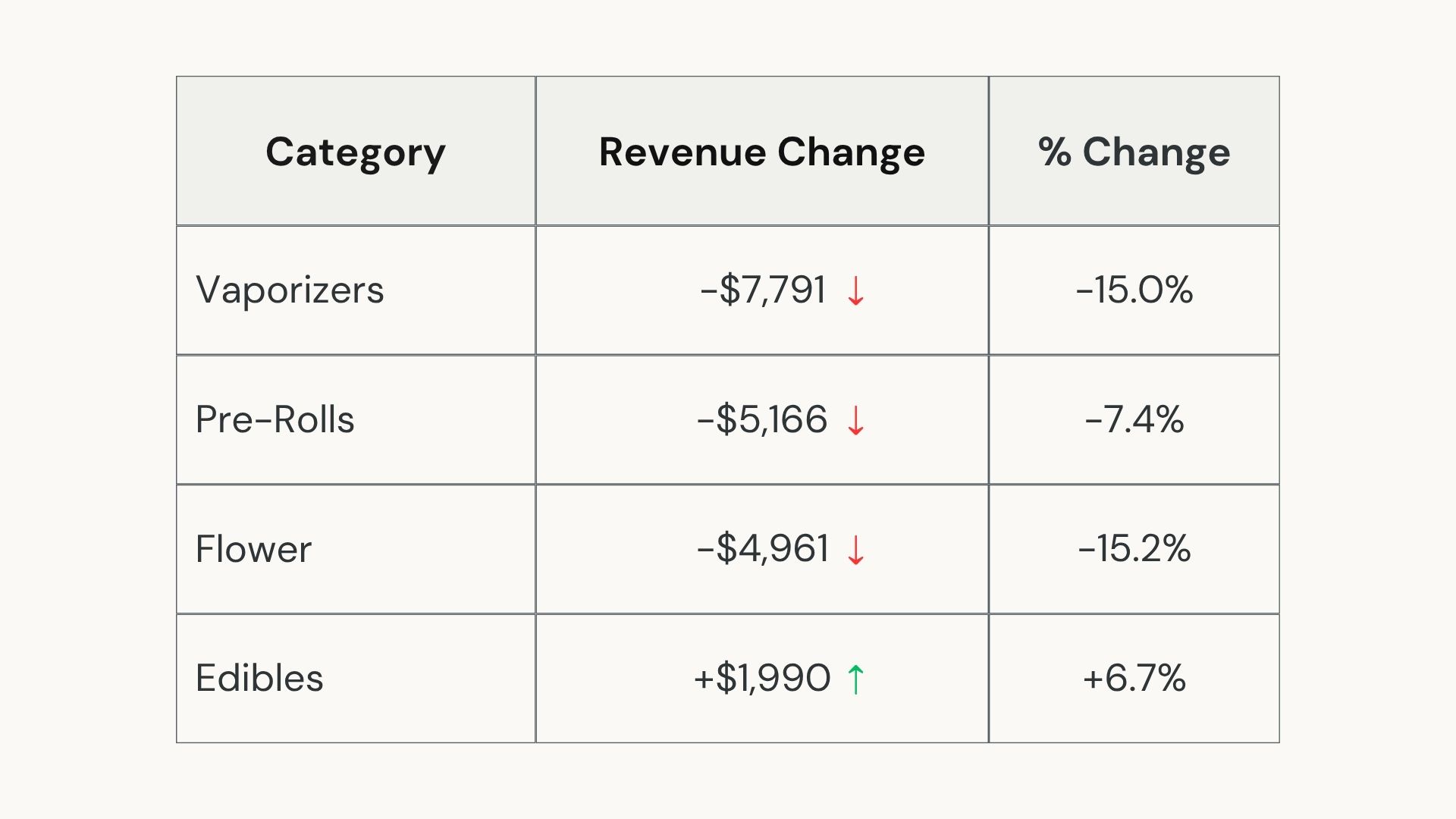
If your revenue is falling, start by breaking the decline down by category.
This shows where the largest dollar losses are concentrated, giving areas to investigate.
For one dispensary we looked at, revenue fell $16,729 (8.9%), over the latest 30-day period.
Breaking that decline down by category showed where most of the lost revenue was coming from.
Vaporizers were the largest source of lost revenue at $7,791, followed by Pre-Rolls at $5,166 and Flower at $4,961.
Edibles gained nearly $2,000, offsetting part of those losses.
That breakdown gives you somewhere specific to focus.
Start With Declining Categories
Compare each category against the previous period to find where the largest dollar losses occurred. Focus on the categories having the greatest impact on your revenue decline.
For this store, we started with Vaporizers.
The next step was breaking that $7,791 loss down further to see which brands and products were responsible.
Find the Brands and Products Responsible
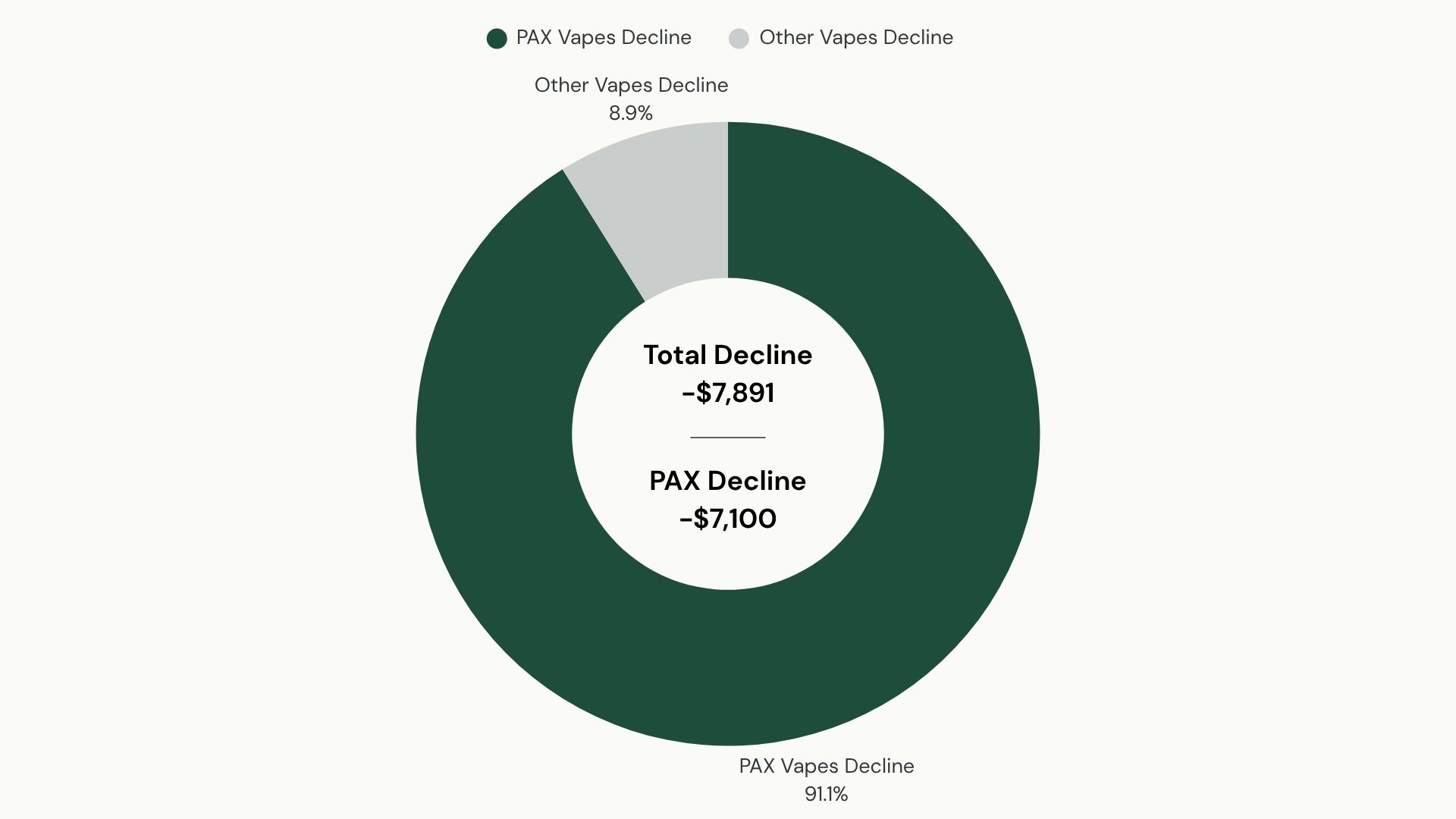
Once you’ve identified the categories responsible for the largest losses, break them down by brand and product. This shows you whether the decline is spread across the category or concentrated in a few parts of it.
For the dispensary we analyzed, Vaporizers lost $7,791.
When we broke that down, PAX brand revenue fell about $7,100, an 85% decline.
Most of the revenue lost from Vaporizers could be traced back to one brand, giving us a place to focus our attention.
The Flower performance showed why it’s useful to go below the category level.
The category lost $4,961, but two brands accounted for larger individual losses:
| Brand | Revenue Change |
|---|---|
| Splash | -$3,258 |
| Bouket | -$2,434 |
| Combined | -$5,692 |
Splash and Bouket lost $5,692 combined—more than the Flower category’s total decline.
Sales growth from other Flower brands offset part of those losses.
Narrow the Losses Down to Specific Products
Run the same breakdown for the categories costing your store the most revenue.
Identify the brands responsible for the largest losses, then drill into their individual products to see where those losses are concentrated.
At this point, you’ve narrowed the problem from your total store revenue to specific products that need attention.
The next step is figuring out why those products stopped generating the same sales.
First, check whether customers still had the opportunity to buy them.
Determine Whether Availability Is Part of the Problem
Once you’ve identified the products behind the decline, check whether they were available for customers to buy.
Look at active inventory, stockouts, replenishment history, and when each product stopped generating sales.
Check Inventory History Against Sales Performance
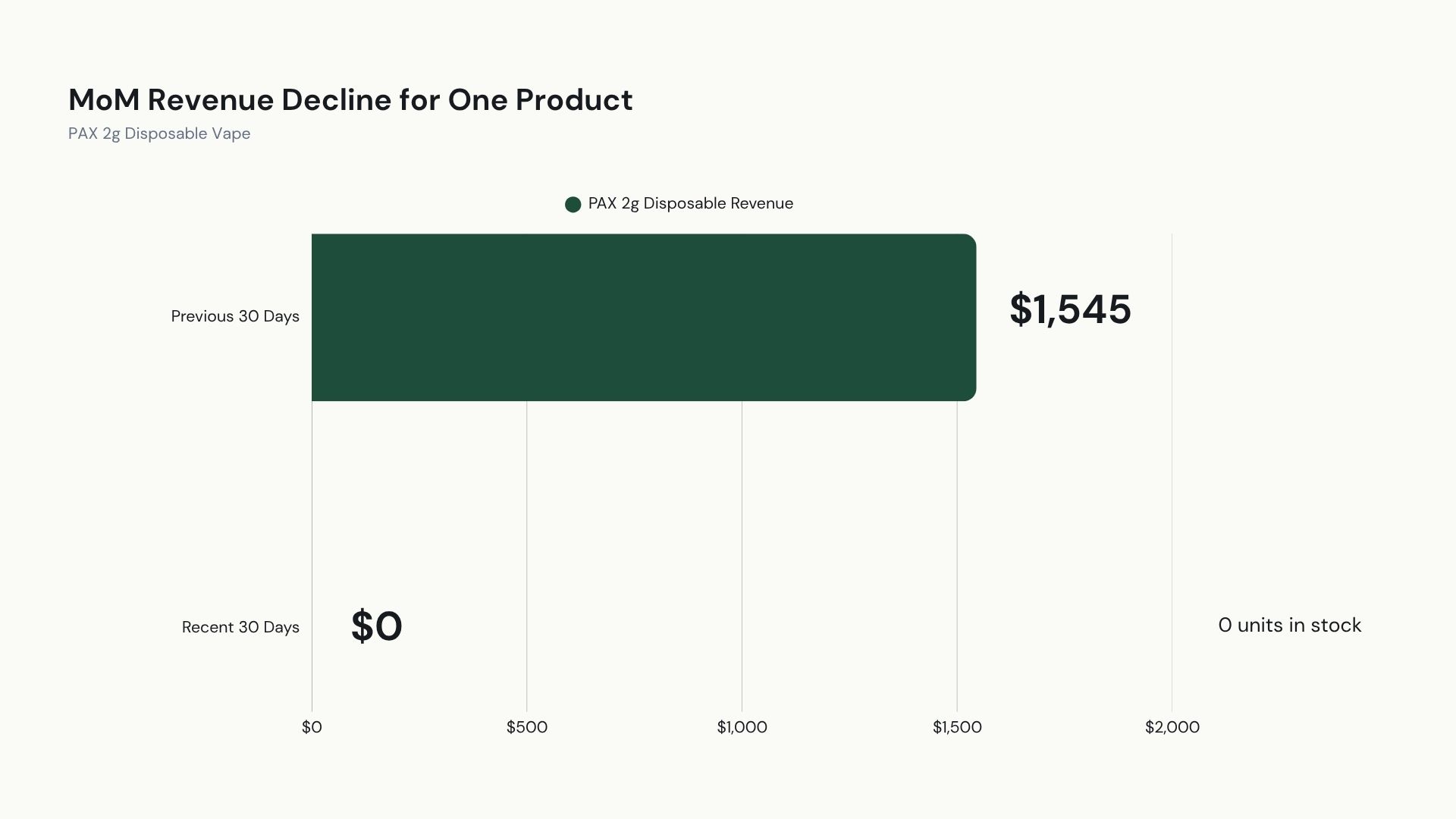
The PAX decline gave us a reason to look into its availability over time.
The brand lost $7,100 in revenue and had four active SKUs, compared to 23 SKUs in its historical assortment.
Those SKU counts cover different periods, so they didn’t tell us when or why the assortment changed. But they did tell us to look more closely at availability.
One product stood out. PAX Sour Diesel 2g Disposable generated $1,545 during the previous 30 days and no revenue during the current period.
The next step was checking whether it was stocked out, discontinued, or replaced, and why.
Look for Gaps in Historically Strong Product Segments
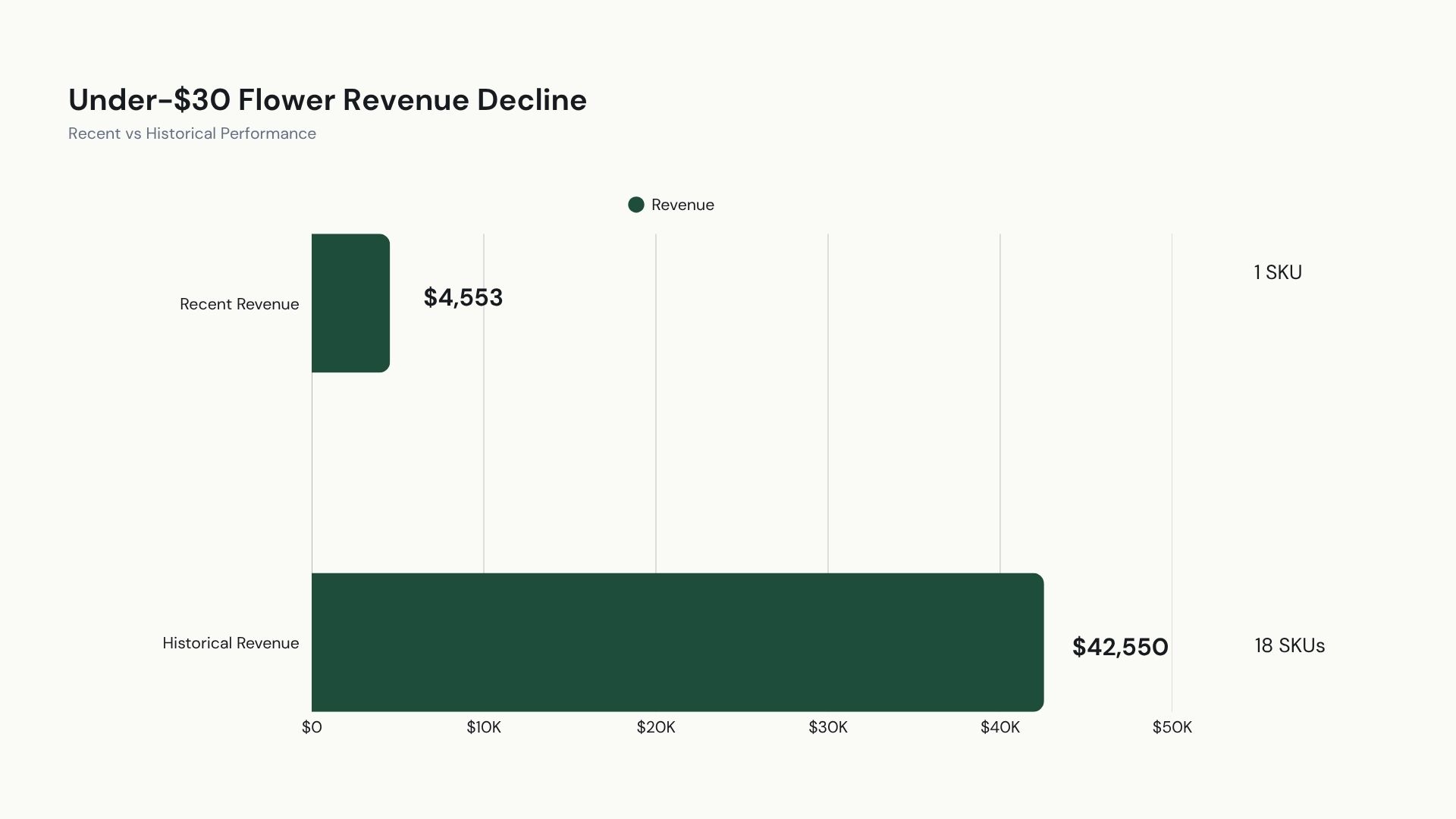
We saw a similar pattern in lower-priced Flower. The store historically carried 18 Flower SKUs priced under $30 and generated about $42,550 in annual revenue from that segment.
When we looked, only one of those products was active, while recent revenue from the segment was down 89.3%.
Use Availability to Decide What to Look at Next
Doing this breakdown gives you products and parts of your menu to check against your inventory history.
Determine when products were available, when they went out of stock, and whether comparable products took their place.
From there, the diagnosis splits.
If a product that used to sell well wasn’t available, determine whether restoring it could recover sales.
If it was available and sales still declined, look into why customers stopped buying at the same rate.
Check If Products are Selling Slower
If the product was available throughout the period, the next step is checking whether customers are buying it at the same rate.
Compare how quickly the product is selling now compared to previous periods and its longer-term average.
Look at Recent Performance Vs. Longer-Term Average
Look at units sold per week or per day in stock to see whether sales are slowing down.
PAX brand revenue was 67% below its 90-day average.
If inventory records show that the products behind that decline were consistently available, you can start looking at what may have changed around their performance.
Look at What Changed Around the Product
Look at what changed around the product, including its price, promotions, placement, and similar products.
See Where Customers Are Buying Instead
If a product continues underperforming, consider adjusting how much you’re ordering or replacing the product if sales continue to decline.
Before making that decision, see if sales went elsewhere.
Customers may be buying less of that product because they’ve shifted to another option in the same category.
Determine Whether You’ve Created an Assortment Gap
Once you’ve looked at individual products, step back and look at the products around them.
If several products serving the same price point have disappeared, you may have a larger gap to look into.
What Assortment Gaps Look Like
We found a good example in this store’s lower-priced Flower.
Historically, the store carried 18 Flower products priced under $30 and generated around $42,550 in annual revenue from that segment.
When we looked at its sales data, only one of those products were active.
Recent revenue from under-$30 Flower was down 89.3% and running 88.1% below its 90-day average.
That gave us a specific part of the assortment to focus on.
How to Find Assortment Gaps
Look at the historical products in the segment and determine how they were performing before they became inactive.
If several were generating consistent sales, there may be customers your current menu isn’t adequately serving.
Make sure your current product selection still gives customers the options they were consistently buying before. That could mean bringing back the strongest historical sellers or finding new products at similar price points.
Find the Revenue You Can Recover
If your dispensary’s revenue is falling, pull your last 30 days of sales and compare them with the previous 30.
Find the categories with the largest dollar losses and start working your way down.
The products behind those losses will tell you what to look at next.
NY Search Group can analyze your sales and inventory data to find where revenue is falling.
Schedule a call to find out where you may be able to recover sales.